
Am I Shadowbanned on X? Check With X’s Own Report (2026)
X never notifies you when it limits your reach, but its Under the Hood report now lists the labels applied to your account and your posts last month. “None in this period” under both headings means no label limited your visibility.
For accounts at least one year old, with 10 posts last month.
In 30 seconds
- 1Log in to X in a browser.
- 2Open x.com/i/under_the_hood.
- 3Check “Post labels” and “Account labels”.
What a shadowban on X actually is
X never uses the word shadowban. It calls it visibility filtering: automated systems or user reports attach a label to a post or to a whole account, and each label limits who can see it. Nothing is deleted and you get no notification, which is why it feels like a ban you cannot see.
In August 2026, X published the code and the full list of these labels on GitHub. Their effects fall into four groups:
- Hidden from recommendations to non-followers. Your followers still see the post, but it no longer reaches new people through For You. This is the most common effect, and what most people mean by shadowban.
- Limited to your profile. The post only appears on your profile, with a notice saying its visibility is limited.
- Hidden from some viewers. Adult or violent content goes behind a warning and is hidden from logged-out visitors, minors and users without a stated age.
- Not shown at all, while X reviews the post, until you delete it, or in the countries where a court or a government asked X to withhold it.
How to check with X’s Under the Hood report
Since September 19, 2026, X shows every eligible account the labels it received. The report is called Under the Hood, and you reach it from its address:
- 01Log in to X in a browserOn a computer or a phone, with the account you want to check. The report only covers your own account.
- 02Open x.com/i/under_the_hoodType the address or follow this link. X opens the report for the last complete month.
- 03Read the two blocksPost labels lists the labels applied to your posts, with the number of posts and their share of the month. Account labels lists the labels applied to the whole account, with the number of days they lasted.
- 04Download the JSON to keep a recordDownload this report (JSON) saves the same data, with X’s own description of each label and its effect.
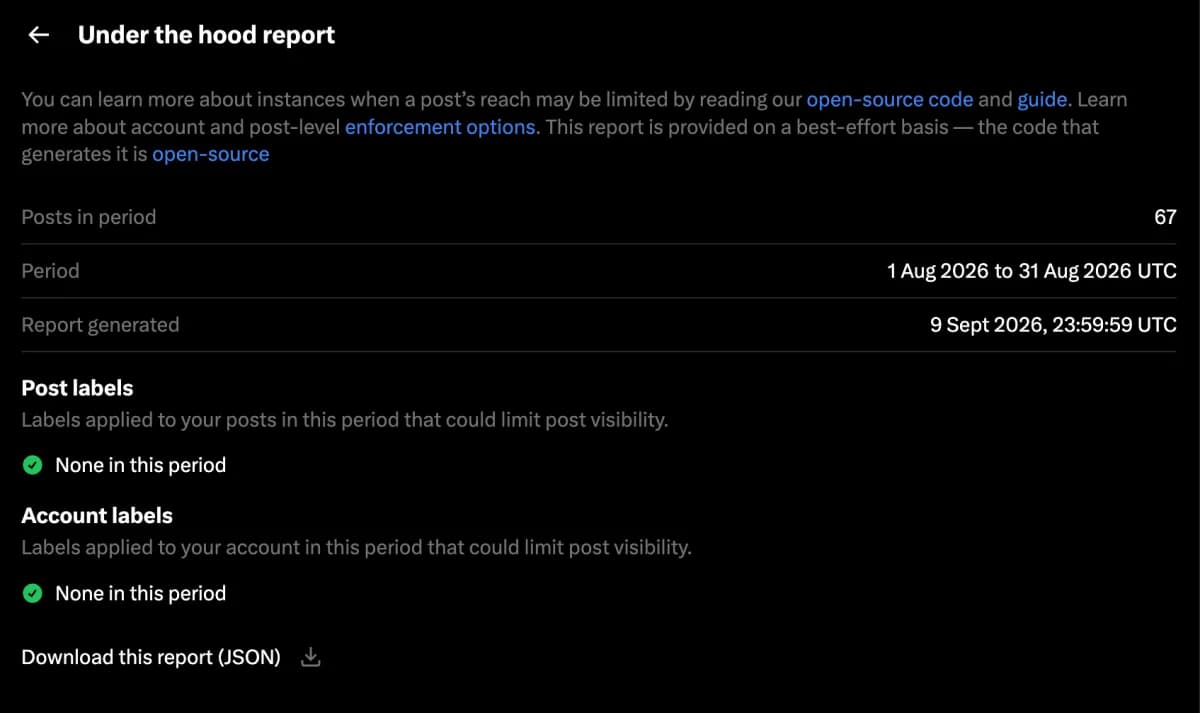
Who can see the report, and when
The report is not live. It covers a full calendar month and appears about 10 days after the month ends: the August 2026 report was generated on September 9. X shows it to accounts that meet two conditions, checked again each month:
- the account is at least one year old;
- it published at least 10 posts during the month the report covers.
What each label means
The report uses X’s internal label names. These are the ones you are most likely to meet, with the effect X describes in its own code.
| Label | Applies to | What it means | Effect |
|---|---|---|---|
| SpamHighRecall | Account | Automated systems think the account may post spam. | Posts hidden from recommendations to non-followers. |
| SPAM_HIGH_RECALL | Post | The post may be spam. | Hidden from recommendations to non-followers. |
| SPAM | Post | The post breaks the Authenticity policy. | Not shown on X. |
| MALICIOUS_URL | Post | The post links to a site flagged as malicious. | Hidden from recommendations to non-followers. |
| NSFW_HIGH_RECALL, NSFW_TEXT | Post | The media or the text may be adult content. | Hidden from non-followers’ recommendations, minors and logged-out visitors. |
| NsfwHighPrecision, NsfwAvatarImage, NsfwBannerImage | Account | The account, its avatar or its banner looks like adult content. | Posts hidden from recommendations to non-followers. |
| FOSNR_ABUSE, FOSNR_HATEFUL_CONDUCT | Post | A reported post was found to break the abuse or hateful conduct rules. | Visible only on your profile, with a limited-visibility notice. |
| AbusiveHighRecall | Account | The activity looks automated or inauthentic. | Posts hidden from recommendations to non-followers, and a security challenge. |
| Compromised | Account | The account looks hacked. | Posts hidden from recommendations to non-followers until the password is reset. |
| DoNotAmplify | Account | A possible terms of service violation is under review. | Posts hidden from recommendations to non-followers. |
| LegalRequest | Post or account | A country sent X a legal demand. | Not shown in that country. |
Search ban, ghost ban, reply deboosting: what about them?
These terms come from the shadowban test sites built before 2023. They describe symptoms seen from outside: posts missing from search results, replies hidden behind “Show more replies”, or replies pushed to the bottom of a thread.
None of them is a label in the list X published. A post hidden from recommendations or limited to your profile produces those symptoms, and the report names the actual cause. The reverse is also true: a reply placed low in a thread is often just ranking, because X orders replies by expected interest, not by date.
To check by hand, use a second account that does not follow you, or ask someone else. X requires an account to search, so a logged-out window no longer works for this test.
- Search from:yourhandle in the Latest tab and check that your recent posts appear.
- Type your name in the search box and check that your account appears in the suggestions.
- Open a post you replied to and look for your reply, including under “Show more replies”.
How to get a label removed
Most labels are applied by automated systems and lifted the same way. The report gives the number of days each account label lasted: a label active 3 days out of 31 may already be gone. What helps:
- Change a flagged avatar or banner. NsfwAvatarImage and NsfwBannerImage target the images themselves.
- Mark your sensitive media. If you post adult or graphic media, turn on the option to mark it as sensitive in Settings, Privacy and safety, Your posts. X’s Adult Content policy requires it.
- Slow down repetitive activity. Identical replies, mass follows and the same link posted again and again are what spam labels look for.
- Check the links you share. MALICIOUS_URL follows the destination, so a compromised site or a dubious link shortener can trigger it.
- Secure the account. Compromised and AbusiveHighRecall come with a password reset or a security challenge: complete it from the notice X shows.
- Appeal a label you think is wrong through X’s appeal form.
Frequently asked questions
- Does X shadowban accounts?
- Not in the sense of making you invisible to everyone. X limits the reach of posts and accounts with labels, and since 2026 it lists them in the Under the Hood report. The most common effect is that your posts stop being recommended to people who don’t follow you.
- Why can’t I open the Under the Hood report?
- Your account must be at least one year old and have published at least 10 posts in the month the report covers. If you meet both conditions, wait for the next report, about 10 days after the end of the month.
- Does the report show search bans?
- Not under that name. It lists labels and their effects, and those labels are what hide posts from search and recommendations. X does not publish a separate search ban.
- Is the report real time?
- No. It covers the previous calendar month, so a label applied today appears in next month’s report.
- Can I see another account’s report?
- No. Under the Hood only shows the account you are logged in with. From outside, you only see public signals, such as a sensitive content warning on the profile or a notice that the account is withheld in your country.
- How long does a label last?
- It depends on the label and on what triggered it. The report shows how many days each account label was active during the month, which tells you whether it may still be in place.
No account. No card. 7 days with every feature.
Try XFeed on your own timeline.
Keep the accounts you follow. Hide everything else.

Related guides